How to open an Anki .apkg file on iPhone without AnkiMobile
You can open an Anki .apkg file on iPhone without AnkiMobile by saving it to the Files app and importing it into another app that reads .apkg decks. In sumi: Flashcards & Revision ($9.99 or £9.99 once, free to try with 1 deck, 100 cards and 2 imports), tap Import cards, then Choose file, and pick the .apkg. The cards arrive as a new deck. Review history does not carry over, and sumi does not show images or audio from Anki decks yet, so text decks work best.
Last checked: 3 November 2026.
How to open an .apkg in sumi, step by step
Get the .apkg file
Shared decks download as .apkg. For your own deck, open Anki on your computer, choose File, then Export, pick Anki Deck Package (.apkg) and tick “Support older Anki versions”. That format brings cloze cards across best.
Put it in the Files app on your iPhone
AirDrop it from a Mac, save it to iCloud Drive, download it in Safari (it lands in Downloads), or save an email attachment to Files.
Open sumi and tap Import cards
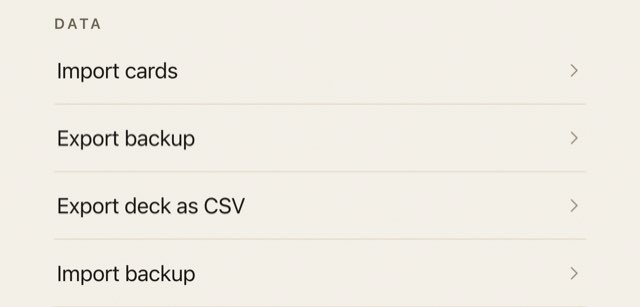
Import cards is on the home screen and in Settings, under Data. Tap Choose file and pick the .apkg from Files.
Check the preview and import
sumi shows how many cards it found and names the deck after the file. Change the name if you like, then tap Import.
sumi also imports CSV, TXT and JSON files. The free tier holds 100 cards. If a deck is bigger, sumi says so before importing and brings in as many cards as fit; sumi Pro removes the limit.
What comes across from Anki, and what does not
| Part of your Anki deck | In sumi |
|---|---|
| Card text, front and back | Yes |
| Cloze deletions | Yes. The gap shows as [...] and the answer is on the back. Export with “Support older Anki versions” ticked |
| Reversed and cloze sibling cards | Combined into one card per note |
| Images | Not shown yet. The text on the card imports; cards that are only an image are skipped |
| Audio | Not played yet. Cards that are only audio are skipped |
| Review history and scheduling | No. Imported cards start fresh as new cards |
| Card styling | Cards show as plain text in sumi's own layout |
How to import an Anki deck into AnkiMobile on iPhone
If you have AnkiMobile ($24.99 or £24.99 once), the official manual gives these routes:
- A file you already have: tap the .apkg in Files, Mail or Messages, tap Open In or Share, and choose AnkiMobile.
- A shared deck: in AnkiMobile tap Add/Export, then Shared Deck List, pick a deck, tap Download, then open the file from Safari's Downloads in Anki.
- Your whole collection with its history: sync through a free AnkiWeb account, or export collection.colpkg from Anki on your computer with “Include scheduling information” on, and AirDrop it across.
Anki deck with images on iPhone: which apps show them
If your deck depends on pictures or sound, such as anatomy diagrams, image occlusion or language audio, pick an app that keeps media. These iPhone apps open .apkg files; the images and history columns are what each developer says, as of 3 November 2026.
| App | Price (US / UK) | Images and audio from .apkg | Review history kept |
|---|---|---|---|
| AnkiMobile Flashcards | $24.99 (£24.99) once | Yes, stored on the device | Yes, through AnkiWeb sync or a .colpkg |
| Guru: Flashcard Study Coach | Free for up to 5 decks; Pro subscription or $24.99 (£24.99) lifetime | Yes (per developer) | Yes, scheduling state (per developer) |
| MintDeck | Free; optional AI credits | Yes (per developer) | Yes (per developer) |
| Mochi | Free; Pro $5 a month billed yearly | Not stated | Yes (per Mochi's docs) |
| Flashy: Simple flashcards | Free for 1 deck and 20 cards; $4.99 (£4.99) once | Images yes (per developer); audio not stated | Not stated |
| Flashi | Free; Pro subscription | Not stated | Not stated |
| Remcard | Free for 2 decks; Pro $4.99 (£4.99) once | Not stated | Not stated |
| Deckbase | Free; subscriptions from $5.99 (£5.99) a month | Not stated | Not stated |
| Flashcards World | Free; paid plans | Not stated (developer says formatting and cloze carry over) | Not stated |
| sumi: Flashcards & Revision | Free to try; $9.99 (£9.99) once | Not yet: the text imports | No |
Prices are from the US and UK App Store and each developer's own site, checked on 3 November 2026. “Per developer” means the claim is the developer's own and we have not tested it. “Not stated” means we could not find it. Prices change, so check the App Store before you buy.
If the .apkg will not open in sumi
- “This deck uses a newer .apkg format”: export it again from Anki with “Support older Anki versions” ticked, then import that file.
- “Every card in this deck is an image or audio card”: sumi cannot import picture-only or audio-only decks yet. Use one of the apps above that keeps media.
- The file is not in the picker: save it to Files first (step 2). sumi opens .apkg files from inside the app, not from the share sheet.
Import one deck free, then $9.99 (£9.99) once.

Questions
Can I open an Anki .apkg file on iPhone without AnkiMobile?
Yes. Save the .apkg to the Files app, then import it into an app that reads .apkg decks. In sumi: Flashcards & Revision, tap Import cards, then Choose file. sumi costs $9.99 (£9.99) once and is free to try with 1 deck, 100 cards and 2 imports. Guru, MintDeck, Mochi, Flashy, Flashi, Remcard, Deckbase and Flashcards World also open .apkg files.
How do I import an Anki deck into AnkiMobile on iPhone?
Tap the .apkg in Files, Mail or Messages, tap Open In or Share, and choose AnkiMobile. For shared decks, use Add/Export, then Shared Deck List inside AnkiMobile. To bring your whole collection with its history, sync with a free AnkiWeb account or AirDrop a collection.colpkg exported from Anki on your computer.
Which iPhone app shows images from an Anki deck?
AnkiMobile stores images and audio on the device. Guru and MintDeck say their .apkg import keeps media, and Flashy says it keeps images. sumi imports the text of each card but does not show images or audio yet.
Does my review history come across when I import into sumi?
No. sumi imports the cards but not review history or scheduling, so imported cards start fresh.
Do cloze cards work in sumi?
Yes. A cloze card imports with the gap shown as [...] and the answer on the back. Export the deck from Anki with Support older Anki versions ticked for the best result.